Learning a language by distance education is very different from being in a class at school. This page provides and overview of how your course works and details on getting started.
Remember: We are here to help 😊! Please contact us if you have any issues or questions.
Overview of how your course works:
To learn a language, you need to practise reading, writing, listening and speaking.
You complete your coursework (reading, writing and listening practice) by working through a weekly workset in the VSL course page. You complete this in your own time. Most of the activities you must submit to your teacher are handwritten in your Writing booklet.
You complete your speaking practice in fortnightly one-on-one Oral Lesson with your VSL teacher. These are conducted by video call using MS Teams.
Watch this video of how your course works:
Key steps to getting started:
When you receive the Enrolment Confirmation email it means enrolment is confirmed and active:
your printed course material will now be mailed to your home/school
you can now set your password and login to the VSL course page
The confirmation email is also CC'd to:
the VSL supervisor at your home school
your VSL teacher
your parent/carer
Haven't recieved the confirmation email?
Check your enrolment status with the VSL Supervisor at your home school.
Does the VSL have the correct email address for you? Confimration emails are sent to the addresses provided to the VSL when enrolments are completed. Check with VSL Supervisor at your home school.
At the beginning of Term 1 (or shortly after your enrolment is confirmed) your teacher will send you a welcome email to introduce him/herself. This email will also include a link to your teacher's Oral Lesson Timetable.
If you haven't received the Welcome email from your teacher check with the VSL supervisor at your home school or contact distanceeducation@vsl.vic.edu.au. Make sure you include your full name, the language and level your are studying.
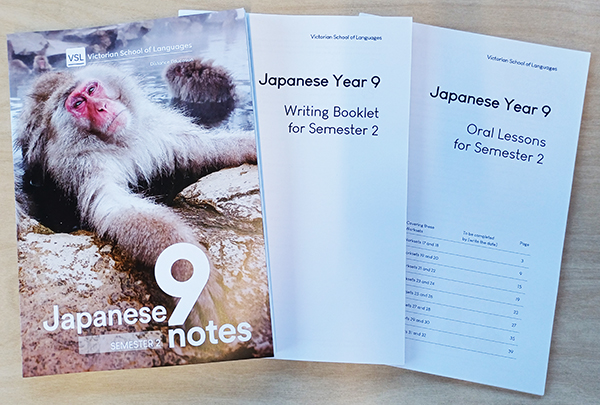
You will also receive supporting printed books to be used in conjunction with the VSL course page. Posted twice a year to your home/school at the beginning of each semester.
Notes: key reading texts, grammar notes, vocabulary lists and other useful information
Writing Booklet: This works in combination with the VSL course page. It includes all the activities you must handwrite and submit to your teacher
Oral Lesson Booklet: You will need to have this with you when you complete your Oral Lessons with your teacher
NOTE: If you haven't received the printed course material yet there are PDFs of all books in the VSL Course page. Go to Resource Library (Books button, top right). You can print the pages you need to get started.
You must use the email address registered with the VSL. This is entered by your home school when your enrolment is completed, and is generally your school email address.
Didn't receive the password reset email? The most common reason for this is that the email you entered does not match the email the VSL has registered for you. You can check with:
your VSL supervisor at your home school
your VSL teacher
help@vsl.vic.edu.au Please include your full name, school and the language and level of your enrolment.
Watch this video:
The VSL course page is the primary resource for your study. Use it to:
complete and submit your weekly course work
access additional resources provided by your teacher
view all your teacher's feedback
Watch this video on how to use the VSL course page:
To submit your handwritten you need to scan and save as a PDF - other filetypes cannot be uploaded.
You can scan with:
A Multi-function printer with a built in scanner. Most of these printers have a document feeders and will automatically scan multiple pages and save as a single PDF file. These scanners make good quaility scans with a smaller file size.
OR
A phone or tablet with a scanning app. There are many free scanner apps such as Camscanner which is available for Andriod and iPhone. Watch this video from Youtube on how to scan mulitple pages as a single PDF and then how to share so you can upload:
Oral lessons are:
one-on-one lessons with your VSL teacher
conducted fortnightly at a regular time
last for about 15 minutes
conducted by video call using MS teams
conducted in school hours
How to book your Oral Lesson:
Your VSL teacher will send you a Welcome email at the beginning of Term 1 (or after your enrolment has been confirmed). This email will include a link to your teacher's Oral Lesson timetable. Open the timetable, find a suitable time and enter your name.
If you can't find a suitable time contact your VSL teacher who will help sort something out
If you haven't receieved, or can't open, the link to the Oral Lesson Timetable email your VSL Teacher
Watch this video for more details about Oral Lessons:
At the beginning of Term 1 your VSL teacher will add you to the class MS Teams page. This will trigger an automated Invite to join the Team. You need to accept this invite.
You need MS Teams set up for your Oral Lessons.
If you haven't receive a Teams invite email your VSL teacher.
The VSL supervisor is a teacher at your home school who is there to support and help with your VSL studies. Your supervisor can help with:
Getting in contact with your VSL teacher at the beginning of the year
Any changes required to your enrolment
Organising IT support for any problems with connecting to the VSL course webpage or the VSL Teams account.
Tracking down hardcopies of the VSL printed material posted to the school
Staying organised and in control of your VSL study.
If you are a VCE student, your supervisor will organise a time and place to complete assessment tasks
If you are home-schooled or a student at VSV, your parent/carer will be your supervisor.
As with all VCE subjects, students will need to complete three formal assessment tasks for each Unit. These assessments will be completed at your home school under supervision.
Materials for your assessment will be sent to your VSL supervisor at your home school.
Speaking assessment tasks will be completed with your VSL teacher via video call with MS Teams. These generally take place in your regular Oral Lesson time.
If you are home schooled or studying with VSV, your parent/carer will supervise these assessment tasks.
For VCE courses, several face-to-face seminars or online webinars are conducted through the year. These are a great opportunity to:
Meet your teachers and fellow Distance Education students
Learn about the requirements of a VCE Languages course and get advice as to how to achieve the best results.
Practise for Assessment Tasks, take part in grammar and conversation workshops.
Seminar/Webinar details will be made available at the start of term.
The VSL provides the following support for parents/carers:
Student progress page: Early in Term 1, parents/carers will be emailed details to the View Student Progress page. This page provides an overview of each student's progress in weekly written / spoken work and VCE assessments where applicable.
Parent/carer information evenings: Held online in the first few weeks of Term 1, these sessions give parents/carers the opportunity to meet teachers who will give an overview of studying with the VSL. Teachers will contact parents with details early in Term 1.
Parent/carer teacher interviews: Conducted online twice a year: Late March and August.
We understand it will take you time to sort all these things out. If you are unsure about something, haven't received an email from you teacher, or can't get access to MS teams or the VSL course page DON'T PANIC - we are here to help
.